 Permanently deleted user
At times you may need to delete a employee. For example they could have been entered twice.
As long as no RTI has been transmitted to HMRC since you added the second record of the employee, you can delete it.
If the RTI has been transmitted you will either have to restore back to the period in which the employee was included in the RTI submission or you will need to make the additional employee a leaver.
The reason for this is because if/when an RTI submission is sent to HMRC with 2 records for the same employee, HMRC will then be expecting higher PAYE payment, treating each record as employee count, therefore resulting the calculation given by KashFlow Payroll to be different from HMRC records.
To delete an employee go to Employees > Overview > All Current > Look for the employee on the list > Highlight the end of the row > A bin will appear, select this.
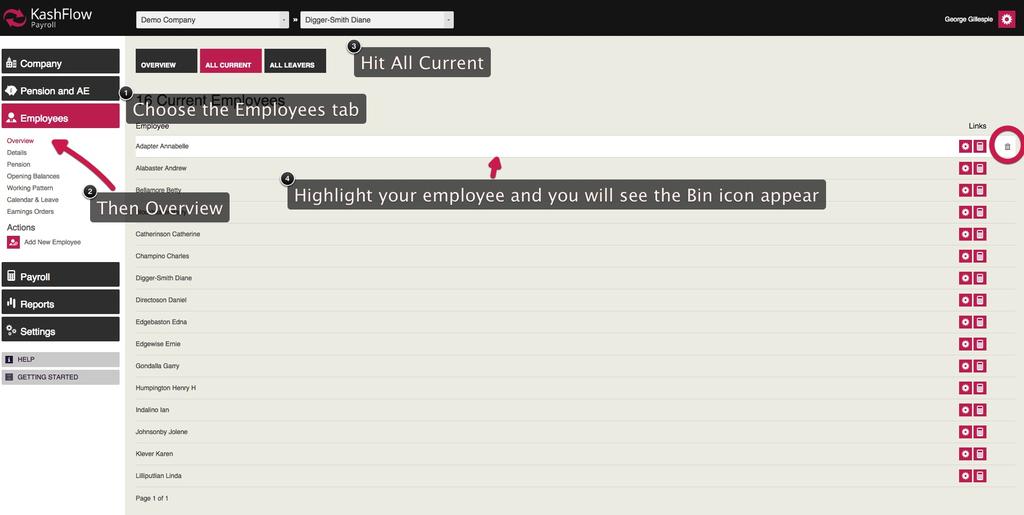
The employee will then be removed.
Restore step's can be found by visiting:
https://kashflow.zendesk.com/knowledge/articles/115000528946/en-us?brand_id=3368406
0 Comments