 Farzana
This article will take you through the procedure which you will be required to take, in order to close a PAYE scheme and notify HMRC of the changes.
Before the company scheme can be closed and a notification sent to HMRC, the following must be complete before the cease trading date is entered.
- Making sure any previous periods missed or not finalised, have been finalised and is brought up to date.
- Making sure that the payslips have been generated
- All employees have been made a leaver.
Step 1 - complete the company cease trading date can be entered by going to: company > setup details > payroll control
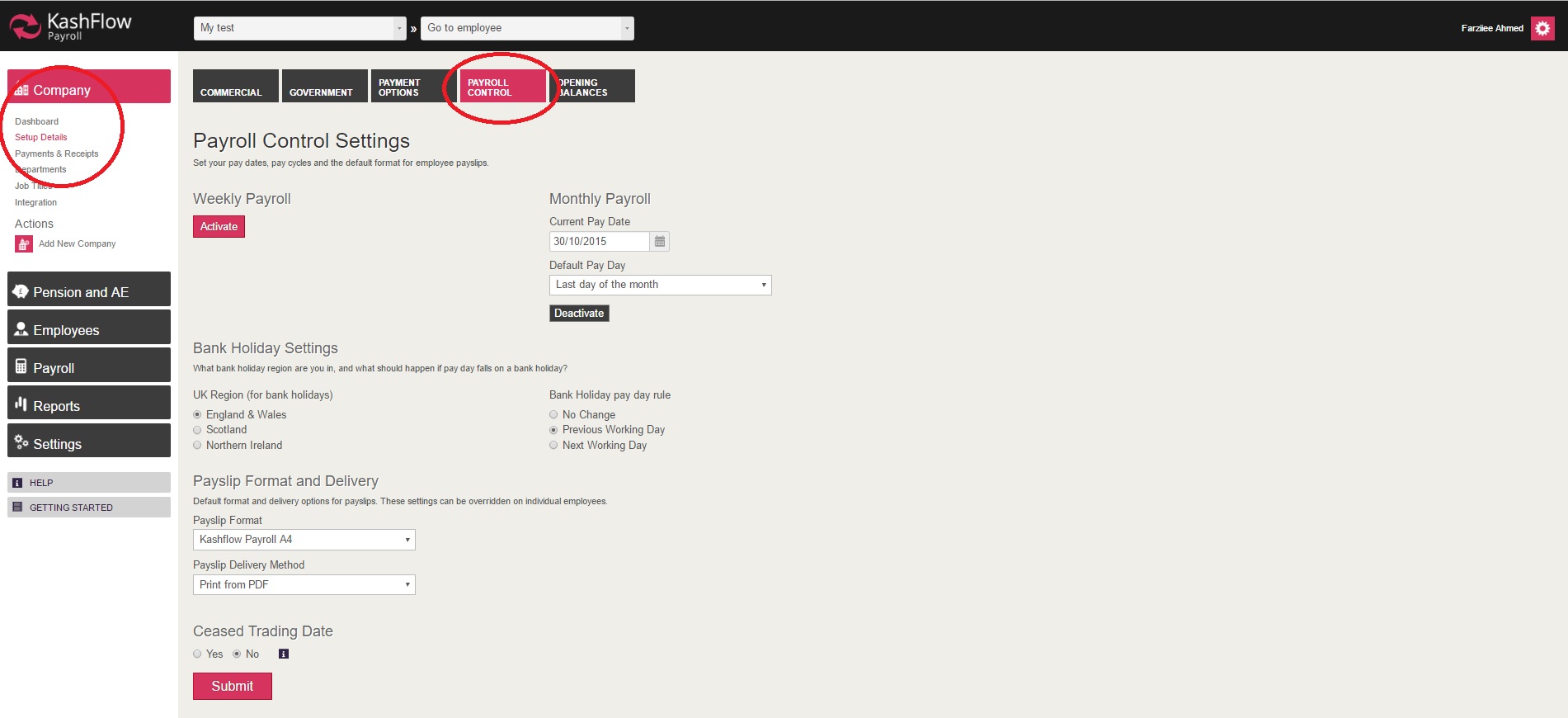
Step 2 - when in the correct area, you will need to tick 'Yes', in order for KashFlow Payroll to enable you for entering in the cease date. You will then need to click on 'Submit' for the changes to be applied.

To send the cease date across to HMRC, you must finalise the current period in which the Payroll is in. This will allow KashFlow Payroll to submit an RTI EPS to HMRC, informing of the cease trading date.
IMPORTANT - before saving the company cease trading date, please make sure that everything is correct and is up to date, as once the date is saved it cannot be removed.
0 Comments